
How to Reduce Admin Work in a Small Business Using AI
A practical guide to reducing repeated admin work in a small business by identifying where it builds up, choosing the right first fix, and using AI where it saves time.
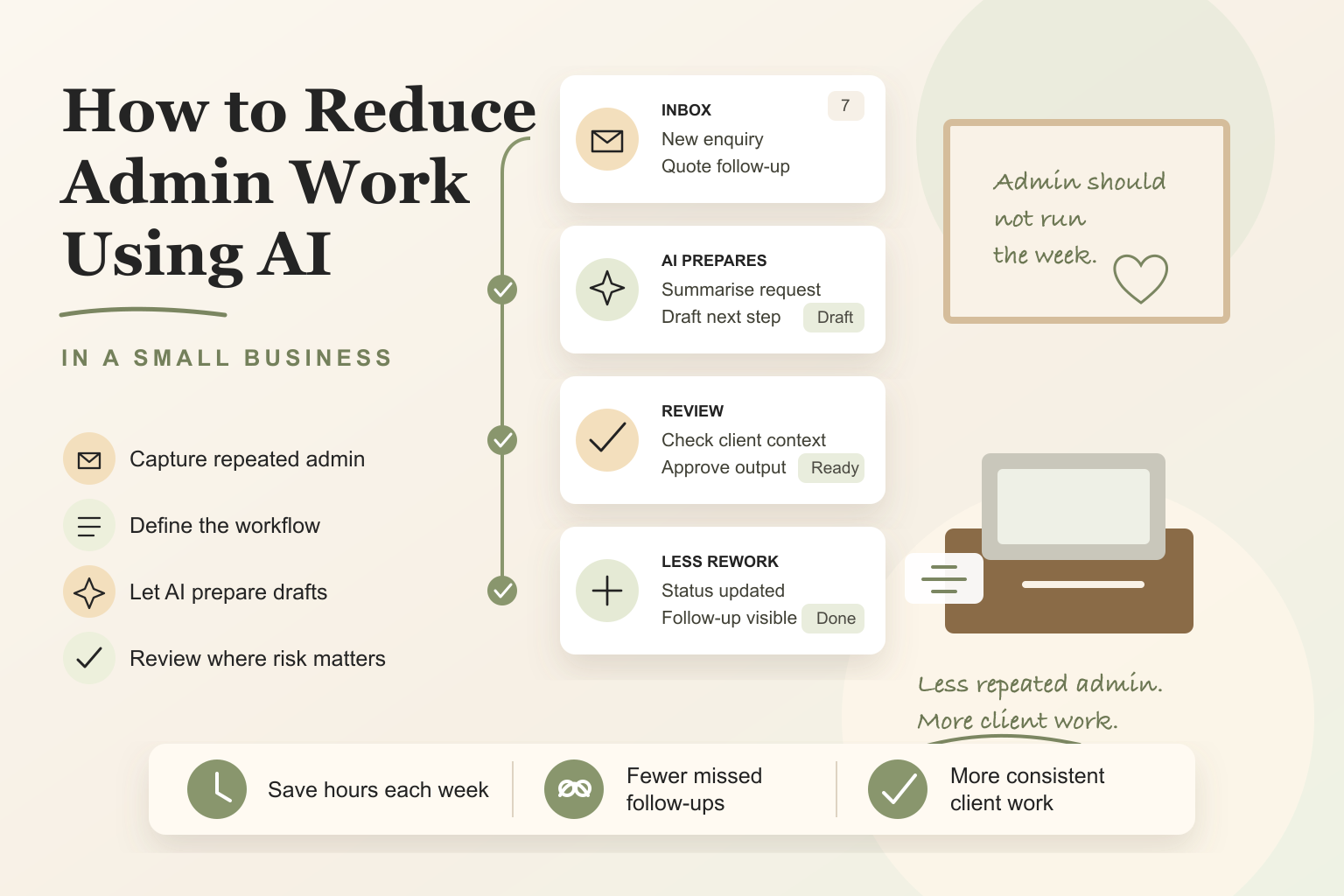
To reduce admin work in a small business, start by removing repeated low-value tasks from daily operations, not by buying more AI tools. Identify the admin that happens every week, define the trigger and owner, then use AI to draft, summarise, classify, or prepare work while people keep review where risk matters.
Most small businesses do not lose time to one massive admin task.
They lose it in small repeated moments.
An enquiry needs a reply. A quote needs follow-up. A new client needs onboarding. A meeting needs notes. A spreadsheet needs cleaning. A document needs chasing. None of those tasks feels dramatic on its own, but together they quietly take over the week.
That is why reducing admin is not just about using AI. It is about improving the way work moves through the business.
If the workflow is unclear, AI usually adds another layer to manage. If the workflow is clear, AI can remove repeated drafting, copying, sorting, and checking from the day.
What does it mean to reduce admin work in a small business?
Reducing admin work means removing repeated low-value steps from daily operations so people can spend more time on work that actually needs their judgement.
It does not mean removing people from the business. It does not mean automating everything. It does not mean buying a stack of tools and hoping the admin disappears.
For a small service business, admin usually builds up around coordination:
- who needs a response
- what information is missing
- what should happen next
- which client needs follow-up
- which notes need to be cleaned up
- which system needs to be updated
- which task has quietly stalled
AI can help with those steps when the task is repeated and the output has a recognisable shape.
The goal is simple: reduce the amount of time your team spends rebuilding the same admin from scratch.
Where admin work usually builds up
Admin usually builds up where the business depends on memory, inbox checking, manual copying, or unclear handoffs.
Common examples include:
- reading and sorting new enquiries
- drafting first replies
- chasing missing client documents
- following up quotes
- preparing onboarding emails
- cleaning up meeting notes
- summarising call notes
- updating spreadsheets
- moving information between tools
- checking whether a client has replied
- preparing internal status updates
The issue is not that any single task is difficult. The issue is repetition.
If an owner spends 10 minutes on quote follow-up once, that is manageable. If the team does that 30 times a month, across inboxes, job systems, and spreadsheets, the real cost becomes obvious.
You can estimate that cost with the business process automation ROI calculator. Use it for one repeated admin task at a time, then decide whether that workflow is worth auditing.
This is why the broader guide on how to automate business processes in a small business starts with mapping the process before choosing the tool. You need to see where the admin is building up before AI can reduce it.
Why small businesses stay stuck in admin
Small businesses usually stay stuck in admin for one of five reasons.
First, the work is spread across too many places. One part of the process lives in email. Another part lives in a spreadsheet. Another sits inside Xero, MYOB, ServiceM8, Tradify, a CRM, or a shared document. No single tool shows the full workflow.
Second, no one has defined ownership clearly. If everyone assumes someone else will follow up, the work becomes invisible until a client chases it.
Third, templates and instructions are missing. The team knows what to do, but each person writes the reply, summary, or checklist differently.
Fourth, follow-up depends on memory. That works on quiet days. It breaks when the business gets busy.
Fifth, the business adds software before fixing the process. This creates more places to check instead of fewer steps to manage.
The issue is rarely effort. Most teams are already working hard. The issue is that the same low-leverage work keeps coming back because the system around it is unclear.
How AI can reduce admin without adding complexity
AI reduces admin best when it is used for narrow, repeated tasks.
That usually means using AI to:
- draft a reply from known context
- summarise a call or email thread
- classify an incoming request
- extract key details from a form
- prepare an onboarding checklist
- rewrite a rough note into a client-ready draft
- create a follow-up reminder from a status change
- turn messy notes into a standard internal format
The useful pattern is not “AI does everything.” The useful pattern is “AI prepares the repeated part so a person does less rebuilding.”
For example, an AI assistant can draft a quote follow-up email using the quote details, service type, and previous message. A person can still check tone, accuracy, and timing before it goes out. That saves time without pretending the business no longer needs judgement.
This is also where reusable instructions matter. If your team repeats the same task every week, do not rely on everyone pasting the same long prompt. Use a shared template or instruction so the output is more consistent and easier to check.
The AI tools guide for Australian small businesses goes deeper on choosing between assistants, connectors, automation tools, and existing business systems. The important point here is simpler: the tool should fit the admin problem, not the other way around.
What admin tasks should you fix first?
The first task you improve should be common enough to matter and simple enough to fix without rebuilding half the business.
Use this process:
- List the admin tasks that happen every week.
- Circle the tasks that involve repeated drafting, copying, summarising, chasing, or checking.
- Choose one task that creates visible friction, such as slow replies, missed follow-up, messy notes, or repeated document chasing.
- Pick the task with the clearest business cost.
- Simplify the current way of doing it before adding any tool.
- Use AI only for the repeated preparation work.
- Test the improvement with real examples, not perfect demo inputs.
- Measure whether it reduced time, rework, delay, or missed follow-up.
Good first candidates usually include:
- enquiry triage and first-response drafting
- quote follow-up reminders
- onboarding emails and document checklists
- meeting note cleanup
- client status summaries
- missing-document follow-up
- internal task summaries
Poor first candidates usually involve rare edge cases, messy inputs, or final judgement on money, compliance, advice, health, safety, or sensitive client issues.
If you want the implementation detail after choosing the right task, the related guide on reducing admin load with AI workflows goes deeper on turning that admin task into a maintainable AI-assisted system.
Manual admin vs AI-supported admin
The practical difference is not that AI removes every step. The difference is that repeated work becomes easier to prepare, check, and complete.
| Admin area | Manual admin | AI-supported admin | Review needed |
|---|---|---|---|
| Enquiry response | Someone reads the enquiry and writes each reply from scratch | AI drafts a first response from form details, service notes, and fit criteria | Check accuracy, tone, and whether the lead is a fit |
| Quote follow-up | Follow-up depends on memory or inbox checking | Workflow prepares a reminder and draft message after a set period | Check timing and commercial context |
| Onboarding | Staff rebuild the checklist and email each time | AI prepares the checklist from client type and service scope | Check client details and required documents |
| Meeting notes | Notes stay messy or need manual rewriting | AI turns rough notes into actions, decisions, and follow-up items | Check decisions and assigned owners |
| Document chasing | Missing items are tracked manually | AI prepares a missing-information summary and reminder draft | Check sensitivity and wording |
| Internal updates | Status is buried in messages and spreadsheets | AI summarises current status into a standard format | Check source records and next actions |
This is the right way to think about AI in admin. It should reduce repeated preparation work. It should not hide the parts where a person still needs to make a decision.
Example: reducing enquiry and follow-up admin
Imagine a small service business that receives enquiries through its website, referrals, and email.
Before the workflow is improved, each enquiry is handled manually. Someone reads the message, checks whether the person is a fit, writes a reply, adds a note somewhere, and tries to remember to follow up if the person does not respond.
That sounds simple, but it creates three problems.
First, response time varies depending on who is busy. Second, follow-up is inconsistent. Third, the owner has no clear view of which enquiries are active, waiting, or lost.
A better approach is to simplify the admin around the enquiry instead of rebuilding the whole process at once.
The business could:
- Use a standard reply structure for new enquiries.
- Let AI prepare a first draft from the enquiry details.
- Review the draft before it is sent.
- Add a simple reminder for follow-up if no one replies.
- Keep one clear place to track whether the enquiry is active, waiting, or closed.
The business has not automated the relationship. It has removed repeated admin around the relationship.
That distinction matters. The client still gets a thoughtful response. The team spends less time rebuilding the same reply. The owner gets better visibility. Follow-up becomes less dependent on memory.
This is the kind of practical, contained improvement that fits my broader AI consultancy work: fix one repeated source of admin, make it easier to run, then expand only if the first improvement proves useful.
What not to automate
Not every admin task should be automated.
Be careful with work that affects:
- money
- compliance
- professional advice
- safety
- staffing decisions
- sensitive client communication
- final records in Xero, MYOB, a CRM, or a job system
AI can still help around those workflows. It can prepare a summary, draft a reminder, flag missing information, or create an exception list. But the final decision should stay with a person where a mistake has real consequences.
You should also avoid automating a process no one owns. If no one is responsible for the output, automation usually creates another unchecked system.
And avoid automating work that only happens occasionally. The first admin reduction win should come from something repeated enough to justify the setup.
The rule is simple: automate the repeated preparation, not the judgement-heavy decision.
Key takeaway
Reducing admin work is a business operations problem before it is an AI tool problem.
If the business does not know where time is being lost, why follow-up breaks down, or which repeated task is creating the most drag, AI will not solve the admin load. It will just create another layer to manage.
But when the problem is clear, AI can be genuinely useful. It can draft, summarise, classify, extract, prepare, and remind. That reduces the repeated low-value work that slows small businesses down.
The best starting point is one repeated admin task that happens every week and creates obvious friction.
If admin is taking over the week, a process audit can help identify the repeated task worth fixing first and the simplest way to improve it.
You can also read the broader guide on what an AI workflow is if you want to understand how AI fits into a repeatable process.
FAQ
What admin tasks can AI help reduce?
AI can help reduce admin tasks that are repeated, structured, and time-consuming. Common examples include enquiry replies, quote follow-up, onboarding checklists, meeting note cleanup, document chasing, inbox triage, and status updates. It is most useful when the output has a clear format and a person can review the result.
How do I reduce admin work without hiring more staff?
Start by finding the admin that happens every week and identifying which task creates the most repeated drag. Then remove unnecessary steps, create reusable templates or instructions, and use AI to prepare drafts or summaries. This reduces wasted effort before adding headcount.
Do I need new software to reduce admin work?
Not always. The first improvement can often use tools already in the business, such as Gmail, Outlook, spreadsheets, Notion, Xero, MYOB, ServiceM8, Tradify, or a CRM. New software only helps when it makes the admin easier to handle consistently and with less manual effort.
What admin work should not be automated?
Do not fully automate work that requires final judgement on money, compliance, professional advice, safety, sensitive client communication, or important system records. AI can prepare drafts, summaries, or checklists, but a person should approve the output where a mistake would create real risk.
How do I know if AI is actually reducing admin?
Measure the business result. Look for time saved, faster response times, fewer missed follow-ups, less copy-and-paste work, fewer repeated questions, and more consistent handoffs. If those outcomes do not improve, the workflow or prompt system needs adjustment.