
AI Workflow Guide
What is an AI workflow? A plain-English guide for small businesses
A practical guide for Australian small businesses that want to understand what an AI workflow actually is and how to build one without overcomplicating the way the team works.
Updated June 2026
Direct answer
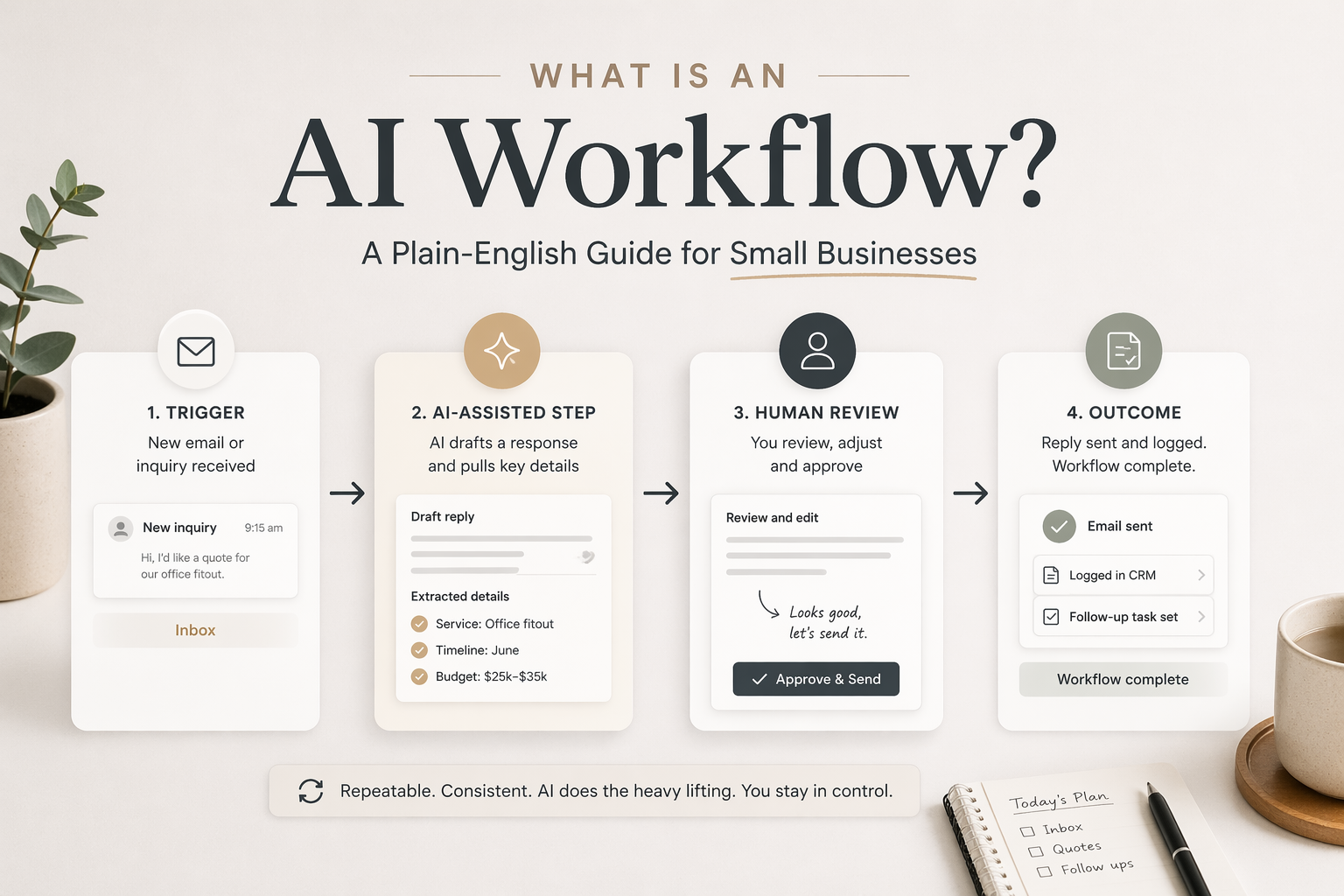
An AI workflow is a repeatable business process where AI handles one defined step — drafting, summarising, classifying, or routing — while a person retains review and approval. The trigger, owner, AI task, review rule, and success measure are all documented. It is the structure around the tool, not the tool itself.
Short answer
An AI workflow is a repeatable business process where AI handles one defined step while the business keeps ownership, review, and outcomes clear.
Best first use
Start with repeated admin: enquiry triage, follow-up, onboarding emails, meeting summaries, or internal note cleanup.
Main mistake
Most teams start with a tool before defining the trigger, owner, input, output, review rule, and success measure.
An AI workflow is a repeatable business process where AI helps with a defined step such as drafting, summarising, classifying, or routing information, while a person still reviews or approves what matters. For small businesses, the best AI workflows reduce admin, speed up follow-up, and fit the tools already in use.
The confusion starts when businesses think AI means a tool first. Someone signs up for ChatGPT, watches a demo, or connects an automation app before the team has defined the process, ownership, review step, or expected result. That is why many early AI attempts feel clever in theory but fragile in practice.
For small service businesses, the useful question is not "Which AI tool should we buy?" It is "Which repeated part of the workflow is wasting time, and what is the simplest way to support that step without creating more complexity?"
What AI can do inside a workflow
- Draft a first-pass reply, follow-up, or onboarding email
- Summarise intake notes, meeting notes, or call transcripts into a standard format
- Classify enquiries, requests, or uploaded documents before human review
- Prepare the next action, reminder, or routing decision from existing context
What is an AI workflow?
An AI workflow is not the same as an AI tool, a one-off prompt, or a fully automated system. A tool is the software. A prompt is a single instruction. A workflow is the repeatable sequence around the work: something triggers the task, AI handles one defined part, a person reviews the output where needed, and the result moves to the next step.
That distinction matters because useful AI is usually operational, not theatrical. A workflow might start when a quote is sent, when a form is submitted, when a client uploads documents, or when a team member saves meeting notes. AI then prepares the next useful output. The business still decides what gets approved, sent, stored, or escalated.
Australian data supports that practical framing. The National AI Centre reported in June 2025 that 41% of Australian SMEs were already adopting AI , and the same tracker's 2025 Q1 update showed 43% of AI-adopting businesses check AI results before they affect customers . That is the right mental model: adoption is rising, but useful implementation still depends on workflow design and human review.
Why small businesses get AI workflows wrong
Most small businesses do not fail because AI is unavailable. They fail because the process is unclear. Ownership is fuzzy. Inputs are messy. Nobody has agreed what a good output looks like. Then AI gets layered on top of that confusion and ends up making the mess faster rather than better.
The usual mistake is tool-first thinking. If the workflow is not mapped, the business does not know what should trigger the task, where information should come from, what needs checking, or how success will be measured. That creates brittle automations, inconsistent prompting, and one-person systems nobody else can maintain.
This is also where ad-hoc prompting breaks down. A useful prompt in one person's head is not the same as a team process. The moment someone else has to run it, review it, or troubleshoot it, the lack of workflow structure becomes obvious. That is why pages like turning ad-hoc prompts into repeatable team processes matter. The workflow has to be bigger than the prompt.
What makes a good first AI workflow?
The best first AI workflow is usually boring in the right way. It happens often, follows a recognisable pattern, has a clear trigger, and creates a visible cost when it is missed. That is why admin-heavy tasks such as quote follow-up, enquiry triage, onboarding emails, intake summaries, and recurring internal notes are strong starting points.
Good first workflows also stay away from final judgement. A first version should not be deciding tax treatment, approving refunds, issuing clinical advice, or handling complex disputes on its own. It should support the work, not own the consequence. Start with review where the downside is real, then reduce that review only when the workflow proves reliable and the risk is low.
A good first workflow usually has these traits
- It happens daily or weekly, not once every few months.
- It has one clear trigger, one main owner, and an obvious next step.
- AI is supporting a narrow task such as drafting, summarising, or classifying.
- The business can measure whether it saved time, improved consistency, or prevented missed follow-up.
If you want a broader view of where small service businesses should begin, this guide pairs naturally with business processes small businesses should automate first , where small service businesses should start with AI and reducing admin load with AI workflows . If the question is how to automate business processes rather than define an AI workflow, use the small-business automation guide next. If you need concrete patterns, the guide to AI workflow examples for small businesses shows how enquiry triage, quote follow-up, onboarding, document chasing, meeting notes, and status summaries work in practice. If you are comparing ChatGPT, Claude, Codex, skills, connectors, and MCP, the AI harnesses guide explains the setup around the workflow.
AI workflow vs manual process: what changes?
The goal is not to remove people from the business. The goal is to remove repeated rebuilding of the same work. A well-designed workflow makes the process clearer, faster, and easier to review.
| Factor | Manual process | AI workflow |
|---|---|---|
| Trigger | Often remembered by a person or buried in an inbox | Clearly defined event, status change, form, or note |
| Effort | Repeated drafting, checking, and copy-paste work | AI prepares the first pass so staff review rather than rebuild |
| Speed | Depends on who is free and whether they remember | More consistent turnaround from a documented sequence |
| Consistency | Varies by person, workload, and memory | Standard inputs and outputs create steadier quality |
| Review step | Often informal or skipped when the team is busy | Named explicitly before anything important moves forward |
| Failure risk | Missed follow-up, inconsistent wording, hidden rework | Risk is reduced when boundaries, ownership, and review are documented |
Another useful distinction
Many teams confuse experimenting with prompts and building an actual workflow. They are related, but they are not the same thing.
Ad-hoc prompting
Useful for experimentation, but hard to repeat, hard to hand off, and too dependent on one person's memory.
Documented AI workflow
Better for a team because the trigger, input, output, review rule, and owner are visible rather than implied.
How to build your first AI workflow
Start by identifying one workflow that is repeated, visible, and low enough risk to test properly. Good candidates include enquiry triage, quote follow-up, onboarding emails, meeting-note summaries, invoice reminder preparation, and internal knowledge retrieval.
Your first workflow should be important enough to matter but narrow enough to improve. If the business cannot tell whether the workflow is better after two weeks, the scope is probably too vague.
Step 1
Identify the right workflow to start with
Start with one workflow that is repeated, visible, and low enough risk to test properly. Good candidates include enquiry triage, quote follow-up, onboarding emails, meeting-note summaries, invoice reminder preparation, and internal knowledge retrieval.
The first workflow should be important enough to matter but narrow enough to improve. If the business cannot tell whether the workflow is better after two weeks, the scope is probably too vague.
Step 2
Map the current process
Before adding AI, write down how the process works today. Do not map the ideal version. Map the real version, including the spreadsheet copy-paste, the side note in the CRM, the missed reminder, and the review step that only happens when someone has time.
Simple workflow map
| Trigger | Who owns it | What happens | Time taken | How often | What must be reviewed |
|---|---|---|---|---|---|
| Quote sent | Admin coordinator | Check status, prepare follow-up, update the record | 8 minutes | 20 times weekly | Message accuracy and timing before sending |
This exposes where AI can help and where it cannot. If the team cannot agree on the trigger, owner, or source information, that is a process problem first.
Step 3
Decide what AI should and should not touch
Give AI a narrow job. It is good at turning messy text into a clean summary, drafting a first-pass message, classifying an enquiry, extracting action items, or preparing the next step from known context.
Keep final judgement with a person. If the output affects money, compliance, health, safety, employment, or a client relationship, the review step should be written into the workflow rather than assumed.
Step 4
Choose the tool
Work inside existing tools first. If the team already lives in Gmail, Outlook, Google Workspace, Microsoft 365, Xero, MYOB, HubSpot, Notion, ServiceM8, or Tradify, check what the current stack can already support before adding another platform.
Add an automation tool only when the process needs reliable handoffs between systems. Zapier is often the lightest option. Make works well when the workflow needs branching logic. n8n suits teams that want more control and can maintain it properly.
Step 5
Build and test
Build the smallest useful version and test it with real examples. Do not automate the whole operating system in one go. Start with one trigger, one output, and one review point so you can see what actually changed.
Compare the AI-assisted version with the old process. Was it faster? Did it improve consistency? Did it create more checking work somewhere else? The first version is supposed to teach you where the workflow needs refining.
Step 6
Document it
A workflow that only one person understands is fragile. Document the trigger, owner, tool, prompt or rule, review step, exceptions, and the metric that says whether the workflow is worth keeping.
One-page workflow document template
- Workflow name and business outcome
- Trigger and source system
- Owner and backup owner
- AI task, prompt, and output format
- Human review rule
- Exceptions and escalation path
- Metric to review after two weeks
Step 7
Measure whether it worked
Measure the business result, not just whether the AI output looked impressive. Track time saved, missed follow-ups prevented, rework reduced, response speed improved, and whether the team keeps using the workflow once the novelty wears off.
If it saves time but creates new risk, tighten the review step. If nobody uses it, either the workflow does not match the real process or the problem was not painful enough. Retiring a weak workflow is still a useful result.
Examples of AI workflows in real small businesses
Bookkeeping onboarding
When a new client says yes, the workflow prepares an onboarding email, document checklist, and Xero access instructions from the agreed service type. A person checks the message before it is sent.
Trades quote follow-up
When a quote sits untouched for two business days, the workflow drafts a follow-up email using the customer name, suburb, and job type, then waits for admin approval before sending.
Allied health intake preparation
When intake notes arrive, the workflow turns them into a clean internal summary and flags missing admin details. It supports preparation, not clinical judgement.
Do you need new software to build an AI workflow?
Usually not at first. The better starting point is the workflow you already run inside your current tools. New software only helps when it makes a clear part of that process more reliable, more visible, or easier to maintain.
This is where most small businesses waste time. They buy another tool before defining the job. If the workflow is still unclear, the extra platform becomes one more place to check instead of a real operational improvement.
If tool choice is the current blocker, read business process automation tools for small businesses . It explains how to choose between existing systems, AI assistants, automation platforms, and custom builds after the workflow is clear.
Key takeaway
Useful AI starts with process clarity, not software complexity. If the workflow is repeated, visible, and worth improving, AI can support it. If the process is still vague, AI will usually magnify the confusion rather than fix it.
Not sure which workflow to start with?
Estimate the cost of one repeated admin task first, or send me the workflow and I will help identify the simplest useful next step.
FAQ
What is an AI workflow in simple terms?
An AI workflow is a repeatable business process where AI helps with one defined task inside the process, such as drafting an email, summarising notes, classifying an enquiry, or routing information. The key difference is that the workflow has a trigger, an owner, a review step, and a clear business outcome. It is not just someone opening ChatGPT and trying a prompt when they remember.
What is the difference between workflow automation and an AI workflow?
Workflow automation moves work between steps automatically based on rules, triggers, and system logic. An AI workflow includes that structure but adds an AI task inside it, such as drafting, summarising, classifying, or extracting information. In practice, many useful workflows use both. Automation handles the movement, timing, and handoff. AI handles the language or information-processing task inside that sequence.
What is the best first AI workflow for a small business?
The best first AI workflow is usually a repeated admin task with a clear trigger, a low downside if the first version needs work, and an obvious business result. Quote follow-up, enquiry triage, onboarding emails, intake summaries, and meeting-note cleanup are common starting points. The aim is to reduce repeated effort without asking AI to make final decisions on money, compliance, health, or client disputes.
Do I need a new automation tool to build an AI workflow?
Not always. Many first workflows can start inside tools the business already uses, such as Gmail, Outlook, Google Workspace, Microsoft 365, Xero, MYOB, HubSpot, Notion, ServiceM8, or Tradify. A tool like Zapier, Make, or n8n becomes useful when information needs to move between systems reliably or when the workflow needs branching logic, logging, and maintenance rules.
How much human review should an AI workflow include?
A first workflow should usually include human review until the process is stable and the risk is clear. Keep review in place wherever the workflow affects clients, money, compliance, health, safety, or trust. For lower-risk internal admin work, review can often become lighter once the workflow is proven and the boundaries are well documented.
Start with one workflow, not another tool
If one admin process is already slowing the team down, the next step is not another tool. It is figuring out where the friction actually sits. That is exactly what the free process audit is for. You can also read about my broader AI consultancy work or, for a bookkeeping or accounting context, the AI for accountants page.
Related reading: AI workflow examples for small businesses, reducing admin load with AI workflows, turning ad-hoc prompts into repeatable team processes , and where small service businesses should start with AI .
Request a free workflow audit