
AI Harnesses
ChatGPT vs Claude: why the harness matters more than the model
A practical guide to the setup around the model: markdown context files, skills, connectors, apps, MCP, scheduled tasks, and the safety rules that make AI useful in a real business.
Published 1 May 2026 · Updated 11 September 2026
Direct answer
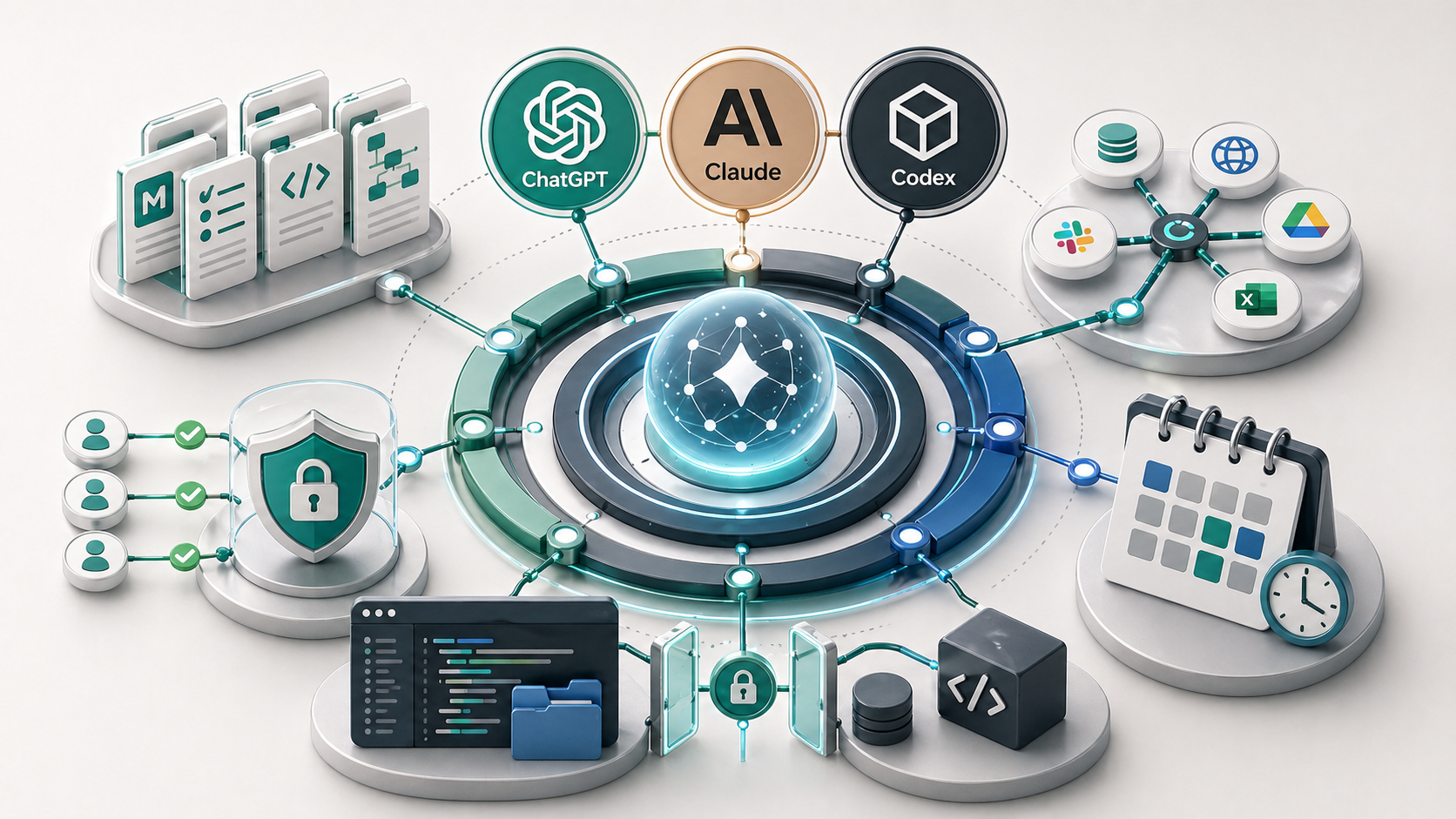
An AI harness is the setup around the model: the context files, reusable instructions, connectors, permissions, and review rules that make ChatGPT or Claude useful for repeated business work. The harness determines how well the model performs in practice — a well-configured harness on either model outperforms a poorly configured one on a better model.
Short answer
For repeated business work, the harness around ChatGPT or Claude usually matters more than the model choice.
Best first setup
Create stable context, one reusable workflow, and one carefully scoped connector before adding more tools.
Main risk
Connecting too much too early can expose sensitive data or create actions nobody reviews.
ChatGPT and Claude both become more useful when they are given a proper harness: structured context files, reusable instructions, skills or custom workflows, connected tools, and clear permission rules. The model choice still matters, but most small businesses get more value by improving the harness around the AI than by switching models.
Most people compare ChatGPT and Claude by asking the same question in both tools and judging the answer. That is useful for a quick feel, but it misses the bigger operational issue. A blank chat is not how a business should use AI for repeated work.
The real difference shows up when the assistant has the right context, instructions, tool access, and boundaries. That is what I mean by an AI harness. It is the operating setup around the model.
This guide is not a fan argument for one model over the other. It is a practical way to think about what needs to sit around ChatGPT or Claude before either one becomes reliable in a small business workflow.
Claude Code and Codex make the same point from another angle. When an assistant can read project instructions, use local markdown context, edit files, run checks, and respect permissions, it becomes much more useful than the same model sitting in an empty chat box.
What people get wrong about ChatGPT vs Claude
The common comparison is too shallow. People ask which model writes better, reasons better, sounds more natural, or gives the cleaner answer. Those differences matter, but they are not the main reason AI works or fails inside a business.
The bigger question is whether the assistant has enough structure to do the job properly. If it does not know your business, your clients, your writing style, your tools, your review rules, or the output format, the model has to guess. Better guessing is still guessing.
That is why the same model can feel average in one business and excellent in another. The second business did not just pick a better model. It gave the model a better harness.
What is an AI harness?
An AI harness is the system around an AI model that makes repeated work more reliable. It includes the context the assistant can read, the instructions it follows, the tools it can use, the automations it can run, and the permission rules that stop it from touching the wrong things.
| Part of the harness | Example | What it does |
|---|---|---|
| Context | about-me.md, writing-style.md, project notes, decision logs | Gives the assistant the background it should not have to relearn every time. |
| Instructions | Custom instructions, project instructions, reusable prompts, skill files | Tells the assistant how to perform a repeated task and what good output looks like. |
| Tools | Apps, connectors, file search, Google Drive, Notion, GitHub, Slack, Gmail | Lets the assistant reference real work instead of relying on copied-and-pasted context. |
| Actions | MCP tools, automations, scheduled tasks, local desktop agents | Lets the assistant do work in a controlled environment, with approval where risk is higher. |
A model without a harness is a smart generalist. A model with a good harness starts to behave more like a trained operator. It still needs review, but it does not need the same context explained every time.
Want an AI harness built around your business?
If your team keeps rebuilding context or using AI inconsistently, I can help turn one repeated task into a practical system with the right context, instructions, tool access, and review rules. Start with a free process audit to identify the first workflow worth implementing.
Request a free process auditChatGPT vs Claude: what changes when you add a harness?
The practical comparison is not just model against model. It is model plus setup against model plus setup.
| Setup | ChatGPT | Claude | Practical read |
|---|---|---|---|
| Blank chat | Strong general assistant for drafting, analysis, research, and connected app workflows where available. | Strong for long-form thinking, careful rewriting, document-heavy work, and coding when used through Claude Code. | Useful, but still easy to lose context between tasks. |
| Project or persistent context | Projects, custom instructions, memory, files, apps, and custom GPT-style workflows can reduce repeated setup. | Projects, memory, project instructions, Claude Code, Desktop, and Cowork-style workflows can do the same. | This is where quality improves because the assistant knows the job before you start. |
| Skills or reusable workflows | Often handled through custom GPTs, projects, saved instructions, apps, or API-side agents. | Claude Skills and Claude Code/Cowork patterns make reusable task instructions very explicit. | Best for tasks you repeat often and need in the same format every time. |
| Connectors, apps, and MCP | Apps and custom MCP connectors can bring in external tools and data, depending on plan and admin settings. | Connectors, MCP, Claude Code, and Cowork-style workflows can give Claude access to tools, local files, and custom integrations. | Powerful, but permissions and data boundaries matter more than the model choice. |
Layer 1: markdown context files
Markdown is one of the simplest ways to give an AI assistant durable context. It is plain text, easy to read, easy to version, and not locked inside a single app. Files like `about-me.md`, `writing-style.md`, `content-strategy.md`, and `content-memory.md` can tell the assistant who you are, how you write, what matters, and what decisions have already been made.
This is not theory. The content system behind this site works the same way. Before writing or editing, the assistant reads the keyword map, content memory, writing style, and relevant brief. That reduces drift because the assistant is not improvising the rules from scratch.
Useful starter context files
- `about-me.md` - positioning, audience, offers, credibility, and practical point of view.
- `writing-style.md` - tone, sentence discipline, structure, examples, and banned habits.
- `content-memory.md` - decisions, lessons, cannibalisation boundaries, and what not to repeat.
- `workflow-rules.md` - how a repeated business process should run.
- `security-rules.md` - what the assistant must never read, write, expose, or commit.
The mistake is putting everything into one giant prompt. The better system is a small set of files that each have a job. That makes the context easier to inspect, update, and reuse across ChatGPT, Claude, Codex, or any other assistant that can read local files.
For a broader business setup, an internal knowledge system turns those context files, SOPs, templates, and decision rules into a maintained source of truth for the team.
Layer 2: skills, projects, and reusable workflows
If you type the same long instruction more than a few times, it probably belongs in a reusable workflow. In Claude, that may mean a Skill with a `SKILL.md` file. In ChatGPT, the equivalent pattern may be a custom GPT, project instructions, saved context, an app workflow, or an API-side agent setup.
The exact product feature matters less than the operating idea. A skill or reusable workflow should define the task, when to use it, what input it needs, what output should look like, and what edge cases should stop the assistant from guessing.
A good first skill candidate
Choose a task that happens every week, has a recognisable input, and needs the same output format. Examples: turn call notes into an action list, convert rough ideas into a blog brief, clean a CSV, summarise a client meeting, or draft a quote follow-up for review.
This connects directly to the idea of an AI workflow. The workflow is the business process. The skill is one way to make the AI-assisted part of that process repeatable.
Where Claude Code and Codex fit into the AI harness idea
Claude Code and Codex are two of the clearest examples of an AI harness because they are not just answering in a chat window. They work inside a real project, with project instructions, local files, specialised skills or agents, terminal access, checks, and permission boundaries.
That matters because it shows where AI work is heading. The useful assistant is not only the model. It is the model plus the work environment around it. In this site's content setup, Codex reads the local content rules before writing: `AGENTS.md`, `about-me.md`, `writing-style.md`, `content-strategy.md`, `content-keyword-map.md`, `content-memory.md`, and the relevant page brief. A Claude Code setup can follow the same pattern with project-level instructions, Claude-specific files, skills, subagents, and local settings.
| Harness part | Example in this setup | Why it matters |
|---|---|---|
| Repo instructions | AGENTS.md | Defines how the assistant should work inside the project before it edits anything. |
| Content context | about-me.md, writing-style.md, content-strategy.md, content-memory.md | Keeps writing, positioning, keywords, and decisions consistent across content work. |
| Briefs and skills | agents/content/briefs/ and .agents/skills | Turns repeated workflows into reusable instructions rather than one-off prompting. |
| Execution | File edits, terminal commands, build checks, and review loops | Moves from advice to implementation, then verifies whether the change actually works. |
| Boundaries | Sandboxing, approval rules, git safety, and secret handling | Stops useful access from becoming uncontrolled access. |
The same pattern applies outside coding. A business can give an assistant a controlled workspace, a set of context files, a few reusable workflows, and permission rules. That is a harness. The assistant becomes more reliable because it is no longer guessing the operating context.
The safety lesson is just as important. Claude Code and Codex-style tools are powerful because they can act. That means the harness needs boundaries: protect `.env` files and API keys, avoid destructive file or git actions without approval, keep permissions narrow, and verify changes with builds, tests, or human review.
Source: Anthropic Claude Code overview.
Layer 3: connectors, apps, plugins, and MCP
Connectors and apps let an assistant work with information outside the chat. OpenAI now describes connected tools in ChatGPT as apps, including apps that search files, support deep research, sync knowledge, or use custom MCP connections. Anthropic describes Claude connectors as a way to connect Claude to tools and data sources, including custom connectors built with remote MCP.
MCP stands for Model Context Protocol. In plain English, it is a standard connection layer that lets AI applications talk to external tools and data sources. A connector might let the assistant search Google Drive, read a Notion database, inspect a GitHub repo, create a task, or query an internal system.
This is powerful because the assistant can work from live or stored business context. It is also where risk increases. A read-only connector that searches a documentation folder is very different from a connector that can update client records, send emails, or modify financial data.
Good connector use
Give the assistant access to a narrow source it genuinely needs, such as a project folder, SOP library, meeting transcript folder, or task board.
Risky connector use
Connect every app, allow write actions everywhere, and assume the assistant will always know when not to act.
Sources: OpenAI apps/connectors, OpenAI MCP docs, Anthropic remote MCP connectors.
Layer 4: scheduled tasks and local automations
Scheduled work is where people often blur two different ideas. Some AI tasks run in the cloud. Others depend on a desktop app, local files, and a computer that is awake.
ChatGPT Tasks are designed to run automated prompts later and proactively notify you. OpenAI says these tasks can run at specific times or recur, and can execute regardless of whether the user is online. That makes them useful for reminders, briefings, recurring research, or lightweight prompt-based workflows.
Local automations are different. If the workflow depends on files on your machine, a desktop agent, a local MCP server, or a browser session on your computer, the computer and relevant app usually need to be available. In practice, that may mean adjusting power settings so the machine does not sleep during a scheduled local task.
The practical rule is simple: use cloud tasks for lightweight recurring prompts and notifications. Use local automations only when the job genuinely needs local files, desktop tools, or a controlled workspace.
Source: OpenAI Tasks in ChatGPT.
What should a small business build first?
Start smaller than you think. Most businesses should not begin with custom MCP servers or a large automation stack. They should begin with stable context and one repeated workflow.
First-harness checklist
- Create one context file that explains the business, audience, offers, tools, and priorities.
- Create one writing-style or output-standard file with examples of good and bad outputs.
- Create one decision log so the assistant can preserve important working rules over time.
- Choose one repeated workflow to turn into a reusable instruction or skill.
- Connect only the tool needed for that workflow, not every app in the business.
- Keep secrets, API keys, tokens, and `.env` files out of any accessible knowledge folder.
This is the same reason I recommend process-first automation. Before you connect tools, map the workflow. Before you build a skill, define the task. Before you schedule a job, decide what result should be checked.
For a practical next step, read the guide on how to automate business processes in a small business.
What to avoid
Avoid connecting everything. More tool access does not automatically create a better assistant. It often creates more places for the assistant to pull the wrong context, expose sensitive data, or take an action that should have required approval.
Keep secrets out of accessible context. Do not put API keys, tokens, passwords, private keys, or `.env` values into markdown files that an assistant can read. Do not commit those files to a repo. Use environment variables, secrets managers, ignored local files, and narrow permissions instead.
Also avoid making the first harness too clever. A small business usually needs one strong workflow before it needs a multi-agent system. A well-documented assistant that handles meeting summaries or quote follow-up is more useful than an impressive setup nobody maintains.
Key takeaway
The useful question is not just "Should we use ChatGPT or Claude?" It is "What harness does this business need around AI so the work becomes repeatable, contextual, and safe?"
If the assistant has no memory, no files, no instructions, no workflow, and no permission boundaries, it will behave like a clever blank chat. If it has the right harness, it can become a practical part of the operating system.
This is also why tool selection should come after workflow design. The AI tools guide, AI workflow guide, and reducing admin load with AI workflows all point to the same conclusion: the system around the tool is what makes the tool useful.
Drill-down guides
This guide is the hub. If you want to build the pieces in order, start with context, then reusable workflows, then connectors, then the practical operating rules around terminal use, scheduling, and safety.
How to set up AI context files
How files like `about-me.md`, `writing-style.md`, `AGENTS.md`, and decision logs help ChatGPT, Claude, and Codex produce more consistent work.
What AI skills are and when to use them
A practical way to turn repeated prompts into reusable workflows with clear inputs, outputs, review rules, and ownership.
MCP and AI connectors in plain English
What connectors, apps, tools, and MCP do, where Codex fits, and how to keep permissions narrow before connecting AI to business systems.
Terminal basics for AI beginners
The small set of terminal concepts that matter when using Claude Code, Codex, local MCP servers, or local automations without blindly copying commands.
Scheduled AI tasks and local automations
What runs in the cloud, what depends on your computer being awake, and how to choose safe recurring AI workflows.
Safe AI workspaces, .env files, and API keys
How to keep secrets, context files, tool access, Claude Code, Codex, and MCP connectors separated by clear boundaries.
FAQ
Is Claude better than ChatGPT for business workflows?
It depends on the workflow. Claude is often strong for long documents, careful rewriting, coding workflows, and file-based work. ChatGPT is often strong as a broad assistant with apps, research, custom workflows, and general productivity use. For most small businesses, the bigger improvement comes from better context, reusable instructions, connected tools, and review rules rather than switching models.
What is an AI harness?
An AI harness is the system around an AI model that makes it useful for repeated work. It can include markdown context files, custom instructions, projects, skills, connected apps, MCP servers, scheduled tasks, permission rules, and review steps.
Where do Codex and Claude Code fit compared with chat assistants?
Codex and Claude Code are practical examples of AI harnesses because they operate inside a working project instead of only answering in chat. They can read project instructions, use local markdown context, edit files, run commands, check work, and follow permission boundaries. The same pattern matters outside coding: the assistant becomes more useful when it can work inside a controlled environment with the right context and safety rules.
Why are markdown files useful for AI assistants?
Markdown files are plain text, structured, portable, and easy for AI assistants to read. Files like about-me.md, writing-style.md, content-memory.md, SOPs, and decision logs can give an assistant stable context without relying on a long prompt every time.
What is MCP in simple terms?
MCP, or Model Context Protocol, is a standard way for AI applications to connect to external tools and data sources. In plain English, it is one of the connection layers that lets an assistant search, read, or act inside approved systems.
Should a small business use connectors or MCP?
Use connectors or MCP only when the workflow needs real business context from another tool. Start with read-only or low-risk access where possible. Do not connect tools just because they are available, and be careful with anything that can modify records, send messages, or expose sensitive data.
Is it safe to connect AI to business tools?
It can be safe when permissions are narrow, the connector is trusted, sensitive data is protected, and write actions require review. It becomes risky when tools are connected broadly, secrets are stored in accessible files, or the assistant can change business records without clear approval.
Build the harness around one workflow
If your team is using AI but keeps rebuilding the same context, the problem is usually the harness around the tool. A process audit helps identify the first workflow worth turning into a repeatable AI system.
You can also read about my broader AI consultancy work or compare when an AI consultant or AI agency makes more sense.
Request a free process audit