
Practical Guide
Internal knowledge systems for small businesses: a practical setup guide
A practical guide for small service businesses that want cleaner SOPs, better handovers, and AI tools that work from real business context instead of guesswork.
Published 3 May 2026 · Updated 3 May 2026
Short answer
An internal knowledge system is a maintained source of truth for SOPs, templates, process rules, examples, and AI-ready business context.
Best first area
Start where repeated questions, handovers, onboarding, client replies, or owner dependency are already costing time.
Main risk
A knowledge base that nobody owns or updates becomes another stale folder rather than a useful operating layer.
An internal knowledge system is a structured source of truth for a small business. It organises SOPs, templates, process notes, client handover rules, decision criteria, and reusable examples so staff and AI tools can find the right answer without relying on memory, scattered documents, or repeated explanations from the owner.
The problem in most small businesses is not that useful information does not exist. It is that the information is spread across inboxes, Google Docs, Notion pages, spreadsheets, old templates, voice notes, chat messages, and individual memory.
That scattered setup creates two problems at once. Staff keep asking the same questions, and AI tools produce generic answers because they do not have a clean source of business context to work from.
What is an internal knowledge system?
An internal knowledge system is more than a folder of documents. It is the operating layer that tells the team where trusted information lives, which version is current, who owns it, and how it should be used in repeated work.
In a small service business, that might include enquiry handling rules, quote follow-up templates, onboarding steps, service descriptions, pricing boundaries, handover notes, and examples of good client communication.
The goal is not to create a perfect documentation library. The goal is to make the information that drives daily work easier to find, easier to trust, and easier to reuse.
Why does scattered knowledge make AI less useful?
AI quality depends heavily on context. If the assistant only gets a vague prompt, it fills the gaps with general patterns. That can sound polished, but it often misses the way the business actually works.
This is why small businesses often get disappointing results from AI. The tool is asked to write, summarise, or advise without knowing the business rules, service boundaries, tone, examples, or review requirements behind the task.
The practical rule
If a person on the team could not find the answer in the current documentation, an AI assistant will usually struggle too. AI does not remove the need for source material. It makes the quality of that source material more important.
What should a small business include first?
Start with the documents that reduce repeated questions and protect client experience. A small business does not need to document everything before the system becomes useful.
- Standard enquiry response rules
- Quote follow-up timing and message templates
- Client onboarding checklist
- Service descriptions and scope boundaries
- Pricing rules and common exceptions
- Handover notes for repeated client work
- Review rules for money, compliance, privacy, and client-facing decisions
These pages support the same kind of work covered in the AI workflow guide. The workflow defines how the task moves. The knowledge system gives the workflow its context.
What does a simple knowledge system look like?
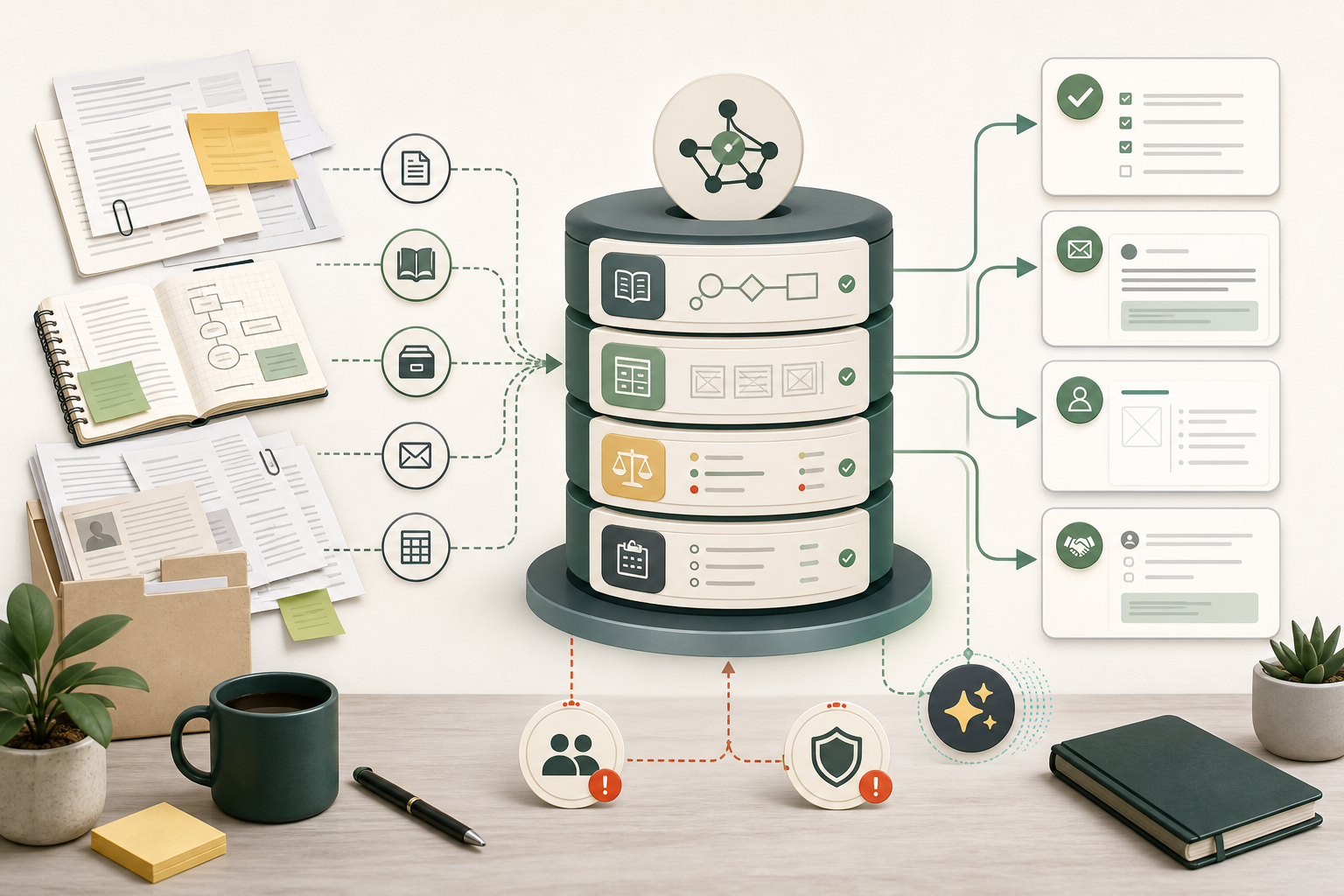
The useful structure is simple: keep the raw material, turn it into clean working pages, define the decision rules, give AI only the context it needs, and maintain the system lightly over time.
| Layer | Example | Job |
|---|---|---|
| Raw source material | Existing SOPs, email templates, service notes, pricing docs, call notes, checklists, and policies. | Preserves the original information so the team can check where an answer came from. |
| Clean internal pages | Short pages for onboarding, quote follow-up, document chasing, client handover, and service delivery. | Turns scattered material into pages people can actually read and use. |
| Decision rules | When to follow up, when to escalate, when to ask the owner, and when AI output needs review. | Stops the system from becoming a pile of documents with no operating logic. |
| Reusable AI context | Business context files, tone rules, process instructions, prompt templates, and examples of good outputs. | Gives AI tools the context they should not have to guess from a fresh prompt. |
| Maintenance log | Owners, dates, open questions, stale pages, contradictions, and decisions made during updates. | Keeps the system current enough to be trusted. |
This is adapted from a broader LLM wiki pattern popularised by Andrej Karpathy: collect source material, compile it into a maintained wiki, query it, and write useful answers back into the system. For a small business, the same idea needs to be simpler. It should support operations, not become a technical hobby.
Background source: Andrej Karpathy's LLM Wiki idea file.
How is this different from a folder of SOPs?
A folder can store information. A knowledge system makes that information usable. The difference is ownership, structure, update habits, and clear rules for how people and AI should use the material.
| Option | Best fit | Strength | Weakness | AI usefulness |
|---|---|---|---|---|
| Basic document folder | A very small team with a few stable files. | Easy to start and familiar. | Usually becomes messy because there is no ownership, index, or update rhythm. | Low unless the files are clean, current, and easy to identify. |
| SOP library | Teams that need clear step-by-step process documentation. | Good for onboarding and repeated work. | Can become too rigid or outdated if nobody maintains it. | Medium. Useful if the SOPs include examples, owners, dates, and review rules. |
| Internal knowledge system | Businesses where knowledge is spread across people, tools, notes, and templates. | Creates a clearer source of truth for staff, handover, and repeated decisions. | Needs a small maintenance habit or it will slowly decay. | High when pages are structured with headings, examples, and clear authority. |
| AI-ready knowledge system | Teams that want AI to retrieve, summarise, draft, or support internal workflows. | Connects business knowledge to reusable AI workflows and safer review rules. | Needs stronger permission boundaries and human review for sensitive work. | Very high when the assistant can access the right material and knows what not to do. |
How do you set one up without overcomplicating it?
Start with one workflow. The fastest way to make the project fail is to document the whole business at once. The better approach is to choose the area where repeated questions, slow handovers, or inconsistent client communication are already costing time.
- Pick one workflow first: Start with the area causing repeated questions or owner dependency, such as enquiries, quote follow-up, onboarding, document chasing, or handover.
- Collect the raw material: Gather the existing emails, templates, checklists, notes, examples, and policies. Do not rewrite everything yet. First, make the source material visible.
- Decide what is authoritative: Mark which document, person, or rule is the source of truth. This matters because AI will repeat outdated information if the system does not show what is current.
- Write clean working pages: Turn the raw material into short pages with clear headings, examples, owners, update dates, and decision rules.
- Add AI instructions carefully: Tell the assistant how to use the knowledge, what output format to produce, when to cite the source page, and when to stop for human review.
- Maintain it lightly: Review the system when a process changes, a staff member asks the same question twice, or an AI output reveals that the underlying documentation is unclear.
This is closely related to setting up AI context files for a small business. Context files are one practical way to give an assistant stable business rules without retyping the same explanation every session.
Good AI uses
- Answer staff questions using the current internal process.
- Summarise the correct steps for a handover or client update.
- Draft an email from approved tone, scope, and follow-up rules.
- Turn a rough process note into a cleaner SOP draft.
- Flag missing information, contradictions, or stale pages for review.
Important boundaries
- Do not let AI invent policy when the knowledge system is silent.
- Do not let AI make final decisions about money, compliance, privacy, health, safety, staffing, or client trust.
- Do not connect every business tool just because it is technically possible.
- Do not store API keys, passwords, tokens, or sensitive client records in general AI context folders.
When is this worth paying for?
An internal knowledge system is worth paying for when scattered information is creating operational drag. Common signs include repeated staff questions, slow onboarding, inconsistent client replies, missed handovers, owner dependency, or AI outputs that need heavy correction because the assistant does not understand the business.
It is not worth turning into a large project if the business only needs one checklist updated. In that case, fix the checklist. Complexity should only be added when it reduces repeated work or protects quality.
The internal knowledge system setup package is designed for the middle ground: more structured than a single document cleanup, but still practical enough for a small service business that does not want a drawn-out transformation project.
How does this connect to AI workflows?
A workflow tells the business what happens next. A knowledge system tells the business what information the workflow should rely on. The two become more useful together.
For example, a quote follow-up workflow might create a reminder, draft a message, and flag stalled opportunities. The knowledge system gives that workflow the approved follow-up timing, tone, exclusions, pricing language, and escalation rules.
This is also why reusable prompt systems matter. If your team is currently relying on ad-hoc prompts, the guide on turning prompts into repeatable team processes explains how to make repeated AI use more consistent.
What should the key takeaway be?
The useful shift is not building a fancy second brain. The useful shift is moving business knowledge out of scattered memory and into a maintained operating layer that staff and AI tools can actually use.
If that layer does not exist, every AI workflow starts from weak context. If it does exist, the business can reduce repeated explanations, improve handovers, and make AI outputs easier to review.
For broader implementation, the guide on automating business processes in a small business shows how to connect documentation, workflow design, and simple automation without overbuilding.
FAQ
What is an internal knowledge system?
An internal knowledge system is a structured source of truth for business information. It organises SOPs, templates, process notes, client handover rules, decision criteria, and reusable examples so staff and AI tools can find reliable answers without relying on memory or scattered documents.
Does a small business need Notion or Obsidian for this?
No. Notion, Obsidian, Google Drive, Confluence, or a shared folder can all work if the structure is clear and someone maintains it. The tool matters less than ownership, current information, useful headings, examples, and review rules.
How is an internal knowledge system different from SOPs?
SOPs usually explain how to perform specific tasks. An internal knowledge system is broader. It can include SOPs, templates, service rules, pricing notes, examples, decision logs, handover notes, and AI instructions that help the team apply the right information in context.
Can AI answer questions from internal documents?
Yes, if the documents are accessible, current, and structured clearly enough for the assistant to use. AI should be treated as a retrieval, summarising, and drafting layer, not as the authority itself. The source document and review rules still matter.
When is an internal knowledge system worth paying for?
It is worth paying for when scattered knowledge is causing repeated questions, poor handovers, slow onboarding, inconsistent client service, owner dependency, or unreliable AI outputs. It is probably not worth a full setup if the business only needs one checklist updated.
Need help structuring your internal knowledge?
If your business knowledge is scattered, the first step is not another AI tool. It is working out which information should become the source of truth, which workflows need it, and where human review still matters. If repeated admin is the main issue, the business process automation ROI calculator can help estimate the cost before the audit.
Request a free process audit